

AWS Connect Email Attachment Forwarding
Solving the Email Attachment Forwarding Challenge in Amazon Connect
Adding an email channel to your Amazon Connect instance is a fantastic way to streamline contact center operations. However, as with any platform, certain complex workflows require custom engineering to get exactly right.
Recently, we encountered a unique technical hurdle: when an agent forwards an email thread, the system does not automatically include the original attachments. This post outlines the problem, the various solutions we explored, and the technical architecture we ultimately deployed to solve it.
The Problem
In standard email clients, forwarding a message usually carries the original attachments along for the ride. Within Amazon Connect, the default behavior for forwarded emails does not automatically package historical attachments.
To understand why, it helps to look at how the platform handles data. The actual raw email and its physical attachments are securely stored in an Amazon S3 bucket. The Connect interface is essentially just displaying a contact record populated with metadata about that email, rather than the file itself. Because the system doesn't hold the physical file in its active memory, hitting "forward" only forwards the text payload, leaving the S3-bound attachments behind.
Exploring Potential Workarounds
Before landing on our final design, we evaluated a few different approaches to balance system design with user behavior:
- Manual Download and Reattachment: The most straightforward, out-of-the-box solution is simply relying on the agent to download the file from the original email to their local machine and manually reattach it to the forwarded draft. While this requires zero engineering effort, it drastically increases agent handle time and leaves room for human error if a critical file is forgotten.
- Direct S3 Bucket Manipulation: From a coding perspective, our first instinct was to bypass Connect and directly copy the historical files within the backend Amazon S3 bucket. While technically possible, this approach proved fragile. Because Connect manages its own file encryption and metadata tracking, copying the raw S3 objects directly resulted in broken file references within the Agent Workspace. We quickly realized we needed a solution that stayed strictly within Connect's intended API architecture.
- Custom UI Elements: We considered building a custom user interface that would allow agents to explicitly select which attachments to include. While robust, this approach introduced significant complexity and potential user adoption issues.
Our Approach: The Lambda-Driven Solution
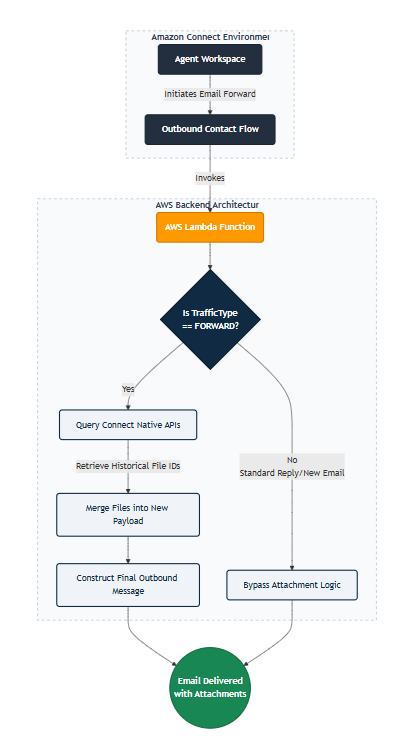
Ultimately, we needed a seamless, automated process that operates entirely in the background. We achieved this by building a custom AWS architecture that intervenes during the outbound email flow.
Key Technical Components
While we cannot share proprietary client configurations, the core of the architecture relies on embedding an AWS Lambda function directly into the outbound contact flow. This allows us to leverage Amazon Connect's native APIs to intercept and modify the email payload just before it leaves the system.
Under the Hood: The Validation Logic
To give you an idea of how this operates in practice, the Lambda function first inspects the event payload passed from the Outbound Contact Flow. It looks specifically for the TrafficType attribute to ensure we aren't accidentally attaching historical files to standard replies.
Here is a sanitized, high-level look at the Python logic we used to validate the routing condition:
def lambda_handler(event, context):
# Extract routing data from the Connect contact flow event
contact_data = event.get('Details', {}).get('ContactData', {})
attributes = contact_data.get('Attributes', {})
# Check if this outbound action is an email forward
traffic_type = attributes.get('TrafficType', 'UNKNOWN')
if traffic_type == 'FORWARD':
print("Forward action detected. Initiating attachment merge...")
# Extract original contact ID to query historical attachments
original_contact_id = contact_data.get('PreviousContactId')
historical_attachments = get_historical_attachments(original_contact_id)
# Merge files and construct the new outbound payload
return construct_forward_payload(historical_attachments)
else:
print("Standard reply or new email detected. Bypassing attachment logic.")
return bypass_logic()
The Routing Complexity: Current vs. Previous Contact
One of the most nuanced challenges in building this architecture is understanding how Amazon Connect manages contact states. In Connect, every single interaction generates a unique identifier known as a ContactId.
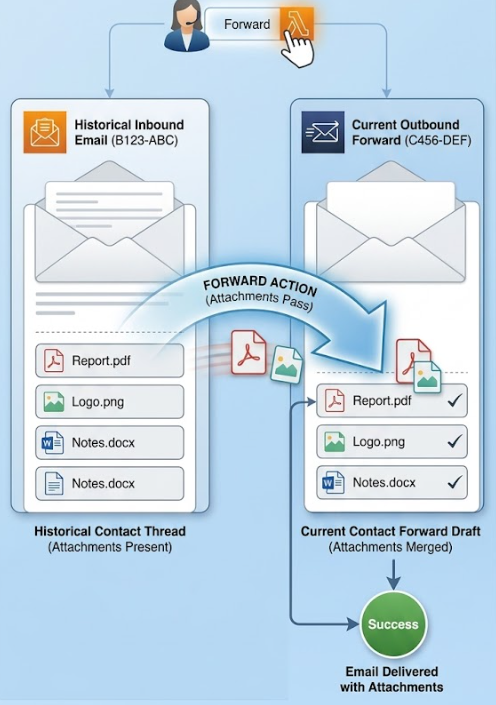
When an agent receives an inbound email, that email has its own original ContactId. However, the moment the agent clicks "forward," Connect generates a brand-new, outbound ContactId for the drafted message.
This creates a distinct architectural gap: the Outbound Contact Flow—and by extension, our Lambda function—is executing against the new outbound contact. But the attachments we need are firmly tethered to the previous inbound contact.
As you can see in the code above, to bridge this gap, our Lambda function has to act as a translator between the two states. It parses the active payload to extract the PreviousContactId, reaches back into the historical thread to query the native APIs for the original file metadata, and then actively binds those retrieved files to the current outbound contact before the email is finally dispatched. (See diagram below)
Security and IAM Permissions
Whenever you introduce a Lambda function to handle file manipulation, security and access control are paramount. Rather than relying on clunky S3 bucket workarounds, our solution uses Connect’s native APIs, which simplifies the permissions model.
To execute this properly, the Lambda function's IAM Execution Role must be granted specific, least-privilege permissions, including:
- connect:GetAttachedFile: Allows the function to retrieve the file metadata and download URLs from the original email thread.
- connect:StartAttachedFileUpload / connect:CompleteAttachedFileUpload: Grants the function the ability to take those historical files and natively bind them to the new outbound email payload.
- logs:CreateLogGroup / logs:PutLogEvents: Standard CloudWatch permissions required to monitor the function and log the validation checks.
By keeping the permissions strictly scoped to Connect's native attachment APIs, the solution remains highly secure and entirely contained within the AWS ecosystem.
The Role of the Lambda Function and Validation Logic
The Lambda function serves as the traffic controller and execution engine for this feature. When an outbound email is initiated, the Lambda performs a series of strict validation checks to ensure it acts safely:
- Traffic Routing: It verifies the context of the email to ensure the automation only fires under the correct conditions.
- Action Validation: The script checks whether the outbound message is a standard reply or a forward. It correctly ignores standard replies, avoiding unnecessary processing.
- File Merging: If the action is a forward, the Lambda function natively queries the historical thread, grabs the references for the original attachments, and bundles them into the new outbound payload.
Handling the Edge Cases
No automated solution is complete without accounting for the edge cases. As we built out this Lambda-driven approach, we had to solve for a few specific scenarios to balance system design with user behavior.
- Merging New and Historical Files: What happens if an agent hits forward, but then needs to attach a new document to the outgoing email? Our Lambda function is designed to detect any newly attached files in the payload and seamlessly merge them with the historical attachments queried from the original thread, ensuring nothing is dropped before the final payload is constructed.
- The "Exclude Attachments" Conundrum: The most challenging edge case we faced was determining how to handle situations where an agent explicitly does not want to forward the historical attachments. We found that creating a user-friendly option to natively exclude these attachments is difficult due to varied user behaviors.
- Exploring Workarounds: To address this, we explored a few potential workarounds, such as requiring agents to use specific keywords in the email draft to trigger a bypass rule, or building custom UI elements. However, custom UI solutions often introduce unnecessary complexity and user adoption issues. We are currently iterating on the least intrusive way to provide agents this flexibility without over-engineering the interface.
Conclusion
By combining Connect's native APIs with the targeted logic of AWS Lambda, we were able to deliver a completely invisible, automated solution to the attachment forwarding challenge. We are currently enabling this feature on a single queue for focused testing and gathering stakeholder feedback before a wider deployment.
Using AWS tools to augment Connect's native capabilities continues to be one of the most effective ways to eliminate friction and build the exact workflows your contact center needs.
At SquareO, we love these types of 'Complexities.' If your company is facing a telecommunications puzzle, let us provide the expert advice to solve it.
Transform Your Call Center Strategy
Unlock the Potential of Your Call Center Operations with Expert Consultation